Juniper Aggregate and Generate Routes
Aggregate Routes
Aggregated routes are used for route summarization, allowing us to represent a large number of routes with a broader network. This helps streamline configuration and reduces the clutter in routing tables.
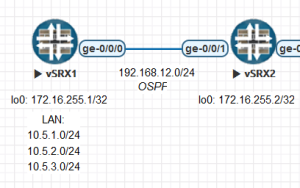
For example, let’s consider a scenario where one of the two routers, both engaged in dynamic routing, has three networks: 10.5.1.0/24, 10.5.2.0/24, and 10.5.3.0/24. Instead of individually announcing these routes to the neighboring router, we can announce them with a single entry, summarizing them as 10.5.0.0/22.
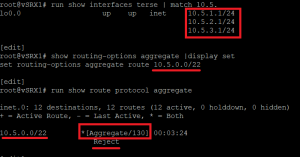
Upon inspecting the control on the device where the aggregation operation is performed, we can observe that the relevant route protocol is “aggregate,” with a default preference value of 130 and a reject type.
If desired, the default reject action can be changed from “reject” to “discard.”
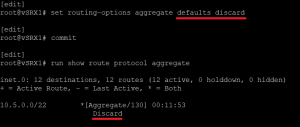
Additionally, for the aggregate route to be active, it requires contributing routes. Let’s take a look at those contributing routes.
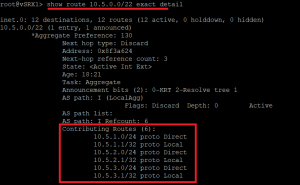
If we lose all contributing routes, the functionality of this aggregate route will cease. Additionally, although the aggregated subnet includes 10.5.0.0/24, there is no contributing route that covers it. When attempting to reach this network, the specified discard action will be taken, as indicated by the next-hop type.
Generate Routes
A different route can be created based on a condition. In our previous example, we had three contributing routes resulting in one aggregate route. However, here, the created route may be independent of contributing routes. Typically, it is used to generate a default route (0/0) based on the existence of a network.
The protocol name for the created route is still referred to as “aggregate.” Structurally, it is similar to an aggregate route. However, during configuration, a generate route definition is made.
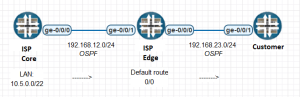
For instance, in the above topology, the ISP Core device is announcing the 10.5.0.0/22 network to the ISP Edge device. On the ISP Edge device, we could instruct it to generate a default route (0/0) and announce it to the Customer router if it possesses the 10.5.0/22 network.
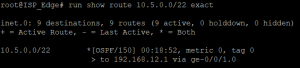
We observe that the ISP_Edge device has the 10.5.0.0/22 network. Let’s now examine the condition that checks for this situation and where it is applied.

The ISP_Edge device is engaged in OSPF communication with the ISP_Core device, and it can learn the 10.5.0.0/22 network via OSPF. The condition policy has been crafted based on this scenario, and to associate the generate route with this condition, the policy has been linked to this route. Now, let’s check whether this route has been created.
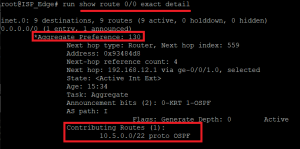
Yes, contributing routes are available, and the 0/0 route has been created. However, as previously mentioned, it appears as an aggregate route with the protocol type set to “aggregate,” despite defining it as a generate route. Now, let’s check whether this route has arrived on the Customer device.
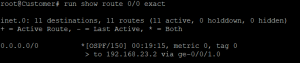
Great, the 0/0 route is indeed visible on the Customer device.