Arista MLAG and Virtual Router Example
In this topology, I have 2 Arista switch and a Cisco switch. I will show an example of how MLAG configured on Arista devices. On Cisco side, due to LACP is not active, I used PAgP. On Arista side there is also virtual router configuration.
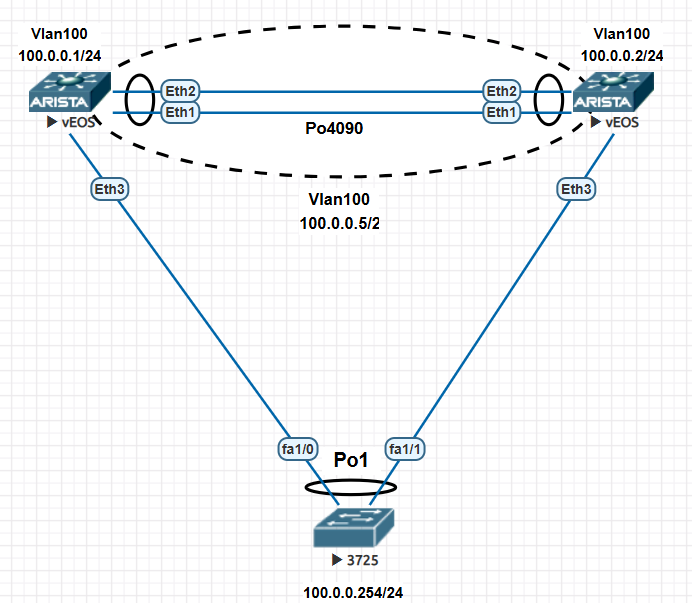
Here are the configurations. First let’s look at the left Arista device.
Arista-Left#sh run
! Command: show running-config
!
hostname Arista-Left
!
! Shortened
!
spanning-tree mode mstp
!
vlan 100
   name CLIENT
!
vlan 4090
   name MLAG_KEEP_ALIVE
   trunk group MLAG_KEEP_ALIVE
!
interface Port-Channel1
   switchport mode trunk
   mlag 1
!
interface Port-Channel4090
   switchport mode trunk
   switchport trunk group MLAG_KEEP_ALIVE
!
interface Ethernet1
   channel-group 4090 mode active
!
interface Ethernet2
   channel-group 4090 mode active
!
interface Ethernet3
   channel-group 1 mode on
!
interface Vlan100
   ip address 100.0.0.1/24
   ip virtual-router address 100.0.0.5
!
interface Vlan4090
   ip address 10.0.0.1/30
!
ip virtual-router mac-address 00:00:11:11:22:22
!
ip routing
!
mlag configuration
   domain-id 4090
   local-interface Vlan4090
   peer-address 10.0.0.2
   peer-link Port-Channel4090
!
end
Let’s talk about the config above. There are two link which they are Eth1 and Eth2. We used these port for MLAG peer link. We make it portchannel as Po4090. VLAN 4090 is for keep alive and also it is trunk for the Po4090. We created it as a trunk group so we seperated other VLANs.
For the MLAG configuration, we need a domain-id, local-interface and peer information. On Arista Left and right sides, if this configuration proper MLAG will be active.
Let’s look at the Arista Righ config.
 Arista-Right#sh run
! Command: show running-config
! Shortened
hostname Arista-Right
!
spanning-tree mode mstp
!
vlan 100
   name CLIENT
!
vlan 4090
   name MLAG_KEEP_ALIVE
   trunk group MLAG_KEEP_ALIVE
!
interface Port-Channel1
   switchport mode trunk
   mlag 1
!
interface Port-Channel4090
   switchport mode trunk
   switchport trunk group MLAG_KEEP_ALIVE
!
interface Ethernet1
   channel-group 4090 mode active
!
interface Ethernet2
   channel-group 4090 mode active
!
interface Ethernet3
   channel-group 1 mode on
!
interface Management1
!
interface Vlan100
   ip address 100.0.0.2/24
   ip virtual-router address 100.0.0.5
!
interface Vlan4090
   ip address 10.0.0.2/30
!
ip virtual-router mac-address 00:00:11:11:22:22
!
ip routing
!
mlag configuration
   domain-id 4090
   local-interface Vlan4090
   peer-address 10.0.0.1
   peer-link Port-Channel4090
!
end
Arista Left and Right have MLAG config proper, so show mlag detail outputs are below
Arista-Left#show mlag detail
MLAG Configuration:
domain-id                          :                4090
local-interface                    :            Vlan4090
peer-address                       :            10.0.0.2
peer-link                          :    Port-Channel4090
hb-peer-address                    :             0.0.0.0
peer-config                        :          consistent

MLAG Status:
state                              :              Active
negotiation status                 :           Connected
peer-link status                   :                  Up
local-int status                   :                  Up
system-id                          :   52:00:00:cb:38:c2
dual-primary detection             :            Disabled
dual-primary interface errdisabled :               False

MLAG Ports:
Disabled                           :                   0
Configured                         :                   0
Inactive                           :                   0
Active-partial                     :                   0
Active-full                        :                   1

MLAG Detailed Status:
State                           :            secondary
Peer State                      :              primary
State changes                   :                    2
Last state change time          :          1:42:57 ago
Hardware ready                  :                 True
Failover                        :                False
Failover Cause(s)               :              Unknown
Last failover change time       :                never
Secondary from failover         :                False
Peer MAC address                :    50:00:00:cb:38:c2
Peer MAC routing supported      :                False
Reload delay                    :          300 seconds
Non-MLAG reload delay           :          300 seconds
Ports errdisabled               :                False
Lacp standby                    :                False
Configured heartbeat interval   :              4000 ms
Effective heartbeat interval    :              4000 ms
Heartbeat timeout               :             60000 ms
Last heartbeat timeout          :                never
Heartbeat timeouts since reboot :                    0
UDP heartbeat alive             :                 True
Heartbeats sent/received        :            1543/1545
Peer monotonic clock offset     :   -18.461423 seconds
Agent should be running         :                 True
P2p mount state changes         :                    1
Fast MAC redirection enabled    :                False
Peer-link forwarding restricted :                False
Interface activation interlock  :          unsupported
Arista-Right#sh mlag detail
MLAG Configuration:
domain-id : 4090
local-interface : Vlan4090
peer-address : 10.0.0.1
peer-link : Port-Channel4090
hb-peer-address : 0.0.0.0
peer-config : consistent
MLAG Status:
state : Active
negotiation status : Connected
peer-link status : Up
local-int status : Up
system-id : 52:00:00:cb:38:c2
dual-primary detection : Disabled
dual-primary interface errdisabled : False
MLAG Ports:
Disabled : 0
Configured : 0
Inactive : 0
Active-partial : 0
Active-full : 1
MLAG Detailed Status:
State : primary
Peer State : secondary
State changes : 2
Last state change time : 1:43:30 ago
Hardware ready : True
Failover : False
Failover Cause(s) : Unknown
Last failover change time : never
Secondary from failover : False
Peer MAC address : 50:00:00:d7:ee:0b
Peer MAC routing supported : False
Reload delay : 300 seconds
Non-MLAG reload delay : 300 seconds
Peer ports errdisabled : False
Lacp standby : False
Configured heartbeat interval : 4000 ms
Effective heartbeat interval : 4000 ms
Heartbeat timeout : 60000 ms
Last heartbeat timeout : never
Heartbeat timeouts since reboot : 0
UDP heartbeat alive : True
Heartbeats sent/received : 1553/1553
Peer monotonic clock offset : 18.461293 seconds
Agent should be running : True
P2p mount state changes : 1
Fast MAC redirection enabled : False
Peer-link forwarding restricted : False
Interface activation interlock : unsupportedWhen we look at the details, MLAG is active and configs are consistent. On output above, one of the Arista is primary and another is secondary. Normally lower system-id becomes primary but in here we used EVE-NG so these two devices system-ids are the same. Actually there is no priorty mechanism for MLAG active/passive. Also we couldn’t change the config for the priority..
When we create on one of the Arista switch the config will be inconsistent. If you want to check if there is inconsisten configuration we can use show mlag config-sanity command. Before we create VLAN 500 and after you can see the output.
Arista-Right#show mlag config-sanity
No global configuration inconsistencies found.h

No per interface configuration inconsistencies found.

Arista-Right#configure
Arista-Right(config)#vlan 500
Arista-Right(config-vlan-500)#name FAKE_VLAN
Arista-Right(config-vlan-500)#exit
Arista-Right(config)#show mlag config-sanity
No per interface configuration inconsistencies found.

Global configuration inconsistencies:
    Feature                   Attribute       Local value    Peer value
-------------- --------------------------- ----------------- ----------
   bridging        admin-state vlan 500            active             -
   bridging       mac-learning vlan 500              True             -
For the virtual router we create a mac address on both sides. If we look from the client side we can see this MAC address for the 100.0.0.5 address. Before using virtual router don’t forget activating routing by using ip routing command.
3725#show arp
Protocol  Address          Age (min)  Hardware Addr   Type   Interface
Internet  100.0.0.1              51   5000.00d7.ee0b  ARPA   Vlan100
Internet  100.0.0.2              50   5000.00cb.38c2  ARPA   Vlan100
Internet  100.0.0.5               0   0000.1111.2222  ARPA   Vlan100
Internet  100.0.0.254             -   c203.1da1.0000  ARPA   Vlan100
We can check the portchannel like below;
Arista-Left#show port-channel 1
Port Channel Port-Channel1:
  Active Ports: Ethernet3 PeerEthernet3
As you see above, the ports on the peer device start with “peer”..
One more try to change MLAG primary and secondary I changed system mac addresses and reloaded the switches , but there is no effect.
Arista-Left#sh run | inc mac
system mac-address 50:00:00:00:00:01
ip virtual-router mac-address 00:00:11:11:22:22
Arista-Left#
Arista-Left#sh mlag deta | inc MAC
Peer MAC address                :   50:00:00:cb:38:c2
Peer MAC routing supported      :               False
Fast MAC redirection enabled    :               False
Let’s check what kind of traffic passing through Vlan4090. These two switches are using TCP 44910 ports for MLAG. src port is seen as l-acoustics, so I need to check it and how can I not resolve for this port when using tcpdump.
Arista-Left#tcpdump interface vlan4090 packet-count 6 verbose
tcpdump: listening on vlan4090, link-type EN10MB (Ethernet), snapshot length 262144 bytes
08:52:10.493349 50:00:00:d7:ee:0b > 50:00:00:cb:38:c2, ethertype IPv4 (0x0800), length 71: (tos 0xe0, ttl 255, id 14433, offset 0, flags [DF], proto TCP (6), length 57)
10.0.0.1.l-acoustics > 10.0.0.2.44910: Flags [P.], seq 1966294672:1966294677, ack 4016761161, win 506, options [nop,nop,TS val 2819140337 ecr 4180773758], length 5
08:52:10.496495 50:00:00:cb:38:c2 > 50:00:00:d7:ee:0b, ethertype IPv4 (0x0800), length 66: (tos 0xe0, ttl 255, id 47070, offset 0, flags [DF], proto TCP (6), length 52)
10.0.0.2.44910 > 10.0.0.1.l-acoustics: Flags [.], seq 1, ack 5, win 501, options [nop,nop,TS val 4180774807 ecr 2819140337], length 0
08:52:10.744797 50:00:00:d7:ee:0b > 50:00:00:cb:38:c2, ethertype IPv4 (0x0800), length 87: (tos 0xe0, ttl 255, id 14434, offset 0, flags [DF], proto TCP (6), length 73)
10.0.0.1.l-acoustics > 10.0.0.2.44910: Flags [P.], seq 5:26, ack 1, win 506, options [nop,nop,TS val 2819140589 ecr 4180774807], length 21
08:52:10.745797 50:00:00:d7:ee:0b > 50:00:00:cb:38:c2, ethertype IPv4 (0x0800), length 125: (tos 0xe0, ttl 255, id 15032, offset 0, flags [DF], proto UDP (17), length 111)
10.0.0.1.l-acoustics > 10.0.0.2.l-acoustics: UDP, length 83
08:52:10.748292 50:00:00:cb:38:c2 > 50:00:00:d7:ee:0b, ethertype IPv4 (0x0800), length 66: (tos 0xe0, ttl 255, id 47071, offset 0, flags [DF], proto TCP (6), length 52)
10.0.0.2.44910 > 10.0.0.1.l-acoustics: Flags [.], seq 1, ack 26, win 501, options [nop,nop,TS val 4180775059 ecr 2819140589], length 0
08:52:11.543878 50:00:00:d7:ee:0b > 50:00:00:cb:38:c2, ethertype IPv4 (0x0800), length 83: (tos 0xe0, ttl 255, id 14435, offset 0, flags [DF], proto TCP (6), length 69)
10.0.0.1.l-acoustics > 10.0.0.2.44910: Flags [P.], seq 26:43, ack 1, win 506, options [nop,nop,TS val 2819141388 ecr 4180775059], length 17
6 packets captured
7 packets received by filter
0 packets dropped by kernel